ADVERTISEMENT
  • About
  • Advertise
  • Privacy & Policy
  • Contact
Office Learner
ADVERTISEMENT
  • Home
  • Browse by Category
    • Word
      • Word Basics
      • Word Data Entry
      • Word Formatting
      • Word Templates
      • Word Tips
    • Excel
      • Excel Basics
      • Excel Shortcuts
      • Excel Charts
      • Data Validation
      • Conditional Formatting
      • Data Analysis with Excel
      • Dynamic Arrays
      • Advanced Excel Topics
      • Developing Excel Related Tools
      • Essential Excel Books
      • Excel for Accountants
      • Excel for Finance
      • Excel Functions and Formulas
      • Excel Pivot Tables
      • Excel Power BI
      • Excel Power Query
      • Excel Templates
      • Excel Training & Courses
      • Macros and Excel VBA
    • PowerPoint
      • Animation
      • PowerPoint Basics
      • PowerPoint Templates
  • About
  • Office Books
  • Courses
No Result
View All Result
  • Home
  • Browse by Category
    • Word
      • Word Basics
      • Word Data Entry
      • Word Formatting
      • Word Templates
      • Word Tips
    • Excel
      • Excel Basics
      • Excel Shortcuts
      • Excel Charts
      • Data Validation
      • Conditional Formatting
      • Data Analysis with Excel
      • Dynamic Arrays
      • Advanced Excel Topics
      • Developing Excel Related Tools
      • Essential Excel Books
      • Excel for Accountants
      • Excel for Finance
      • Excel Functions and Formulas
      • Excel Pivot Tables
      • Excel Power BI
      • Excel Power Query
      • Excel Templates
      • Excel Training & Courses
      • Macros and Excel VBA
    • PowerPoint
      • Animation
      • PowerPoint Basics
      • PowerPoint Templates
  • About
  • Office Books
  • Courses
No Result
View All Result
Office Learner
No Result
View All Result
Home Excel

XLOOKUP vs VLOOKUP: Why You Should Switch Right Now (With Examples)

Tanjila Rashid by Tanjila Rashid
May 23, 2026
in Excel
0
XLOOKUP vs VLOOKUP: Why You Should Switch Right Now (With Examples)
0
SHARES
0
VIEWS
Share on FacebookShare on Twitter
ADVERTISEMENT

XLOOKUP vs VLOOKUP: Why You Should Switch Right Now (With Examples)

Published on officelearner.net | Excel | May 2026

VLOOKUP has been a staple of Excel for decades. Many users have spent hours debugging why it broke after someone inserted a column. The good news? XLOOKUP was introduced in 2019, and in 2026 there is simply no reason to keep using VLOOKUP.

What Is VLOOKUP?

VLOOKUP searches for a value in the leftmost column of a range and returns a value from a column to the right.

Advertisement. Scroll to continue reading.

Key limitations of VLOOKUP:

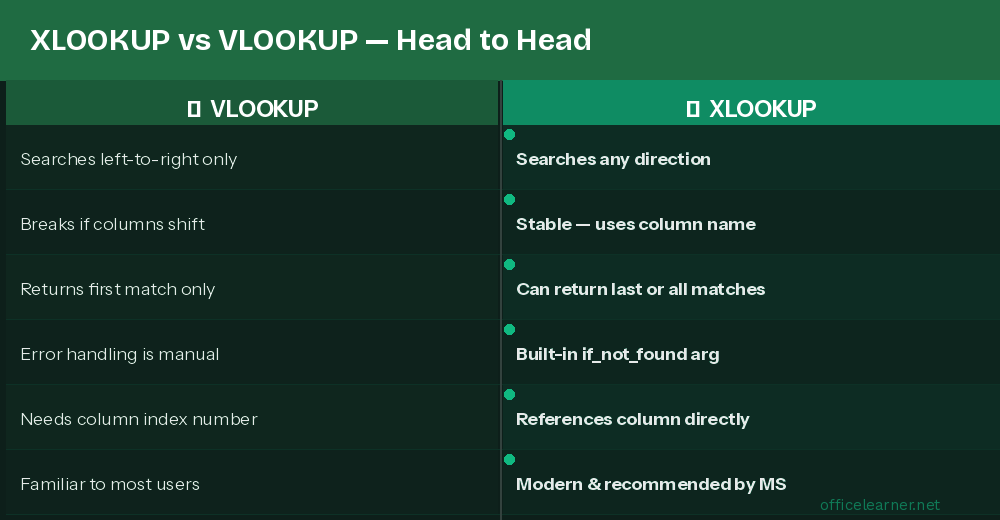
Can only search left-to-right

Column index number breaks if columns are inserted or deleted

Returns first match only with no built-in error handling

Enter XLOOKUP: The Modern Replacement

Key advantages of XLOOKUP:

Searches in any direction: left, right, up, or down

References the return column directly, not by index number

Built-in if_not_found argument for clean error handling

Can return the last match or all matches

Real Excel Examples

Find an employee salary by their ID

Look up a value to the LEFT of the lookup column

VLOOKUP cannot search leftward. XLOOKUP handles it easily:

Return a message if a value is not found

How to Migrate Existing VLOOKUP Formulas

Identify the VLOOKUP: =VLOOKUP(A2, D:F, 2, FALSE)

Note the lookup column (D) and return column (E = column 2)

ADVERTISEMENT

Rewrite as: =XLOOKUP(A2, D:D, E:E, "Not Found")

Test the result to confirm it matches

Remove the VLOOKUP and commit to XLOOKUP going forward

Make the Switch Today

XLOOKUP is simpler, more reliable, and more powerful in every scenario. Make it your default lookup function starting now.

Visit officelearner.net for more Excel tutorials and tips.

ADVERTISEMENT
Previous Post

10 Microsoft Copilot Features in Word & Outlook That Will Transform Your Workday

Next Post

How to Use DPRODUCT Function in Excel (6 Practical Examples)

Tanjila Rashid

Tanjila Rashid

Next Post

How to Use DPRODUCT Function in Excel (6 Practical Examples)

Stay Connected test

  • 86.2k Followers
  • 23.9k Followers
  • 99 Subscribers
ADVERTISEMENT
  • Trending
  • Comments
  • Latest
The Evolution of Microsoft Word: A Brief History

The Evolution of Microsoft Word: A Brief History

May 3, 2023

How to Merge and Center Selected Cells in Excel (4 Ways)

February 5, 2023
How to Use Excel SUMIF to Sum Values Greater Than 0

How to Merge Cells in Excel Without Merging Actually

May 3, 2023

How to Create a Weighted Sales Pipeline in Excel

February 5, 2023
Spreadsheet Layout

What is spreadsheet? and how it works!

0
Spreadsheet Layout

Spreadsheet Layout

0
Spreadsheet Layout

IF function of Google Sheets – usage and formula examples

0

5 Google Sheets tricks that you always need!

0

How to Create Material Reconciliation Format in Excel

May 23, 2026

How to Create Radar Chart with Radial Lines in Excel

May 23, 2026

How to Draw 3-Axis Scatter Plot in Excel (with Easy Steps)

May 23, 2026

[Fixed!] Excel MATCH Function Not Working

May 23, 2026

Recent News

How to Create Material Reconciliation Format in Excel

May 23, 2026

How to Create Radar Chart with Radial Lines in Excel

May 23, 2026

How to Draw 3-Axis Scatter Plot in Excel (with Easy Steps)

May 23, 2026

[Fixed!] Excel MATCH Function Not Working

May 23, 2026
Office Learner

OfficeLearner is a place where you can learn PowerPoint, Excel, Word Data Analysis, and other Office related programs. We provide tips, how to guide and also provide Excel solutions to your business problems

Follow Us

DMCA.com Protection Status

Browse by Category

  • Advanced Excel Topics
  • Copilot
  • Copilot / AI
  • Copilot / M365
  • Copilot Studio
  • Excel
  • Excel / Copilot
  • Excel Basics
  • Excel Functions and Formulas
  • Forms / Excel
  • Loop
  • Loop / Collaboration
  • OneNote
  • OneNote / Copilot
  • Outlook
  • Outlook / Copilot
  • Power Automate
  • Power Automate / Copilot
  • PowerPoint
  • PowerPoint / Copilot
  • PowerPoint Basics
  • SharePoint
  • SharePoint / Copilot
  • Teams
  • Teams / Copilot
  • Uncategorized
  • Word
  • Word / Copilot
  • Word Basics
  • Word Tips

Recent News

How to Create Material Reconciliation Format in Excel

May 23, 2026

How to Create Radar Chart with Radial Lines in Excel

May 23, 2026
  • About
  • Advertise
  • Privacy & Policy
  • Contact

© 2022 OfficeLearner - Free Excel, PowerPoint & Word Tutorial & Online Courses

No Result
View All Result

© 2022 OfficeLearner - Free Excel, PowerPoint & Word Tutorial & Online Courses

This website uses cookies. By continuing to use this website you are giving consent to cookies being used. Visit our Privacy and Cookie Policy.