
Count complete supply packs with Excel QUOTIENT
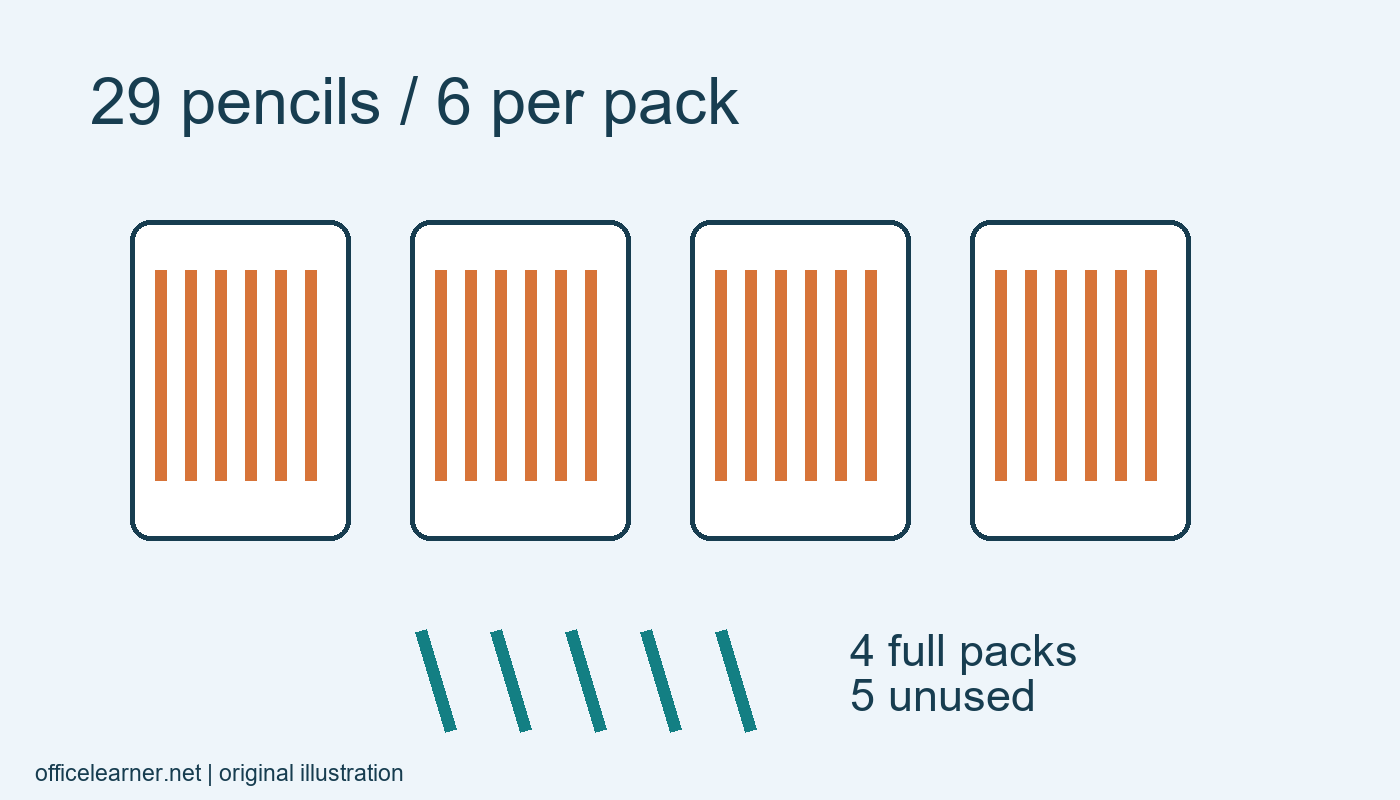
Use QUOTIENT when you need the number of complete packs that can be made from a positive whole-number stock count. For example, twenty-nine pencils packed six at a time make four complete packs. The formula =QUOTIENT(29,6) returns 4. It deliberately leaves out the unused pencils. This tutorial builds an original workshop supply calculation and explains how to check whether the answer matches the practical question.
The worked example uses ordinary worksheet formulas rather than macros or newer dynamic array features. Microsoft's current reference lists Excel for Microsoft 365 and several perpetual desktop versions, including Excel 2024 and 2021, on supported platforms. Ribbon appearance is unimportant here because you type the formula directly. Function names and argument separators may vary with your language and regional settings. Use the equivalent localized function and separator if your installation requires them.
Build the stock table
Open a practice workbook. Type Item in A1, Available in B1, Per pack in C1, Complete packs in D1, and Unused in E1. In row 2 enter Pencils, 29, and 6 in the first three columns. In row 3 enter Erasers, 14, and 2. In row 4 enter Cards, 25, and 4. These are invented quantities for learning, so there is no need to connect a real inventory system or expose purchasing information.
Keep units consistent. Available and Per pack both count individual objects in this table. If B2 represented boxes while C2 represented individual pencils, the formula would still produce a number, but it would answer a meaningless question. Write a short note above your table or on another sheet explaining that all quantities are individual items. A correct calculation starts with numbers that describe compatible things.
Calculate complete groups
Select D2 and enter =QUOTIENT(B2,C2). Press Enter. The expected result is 4. Enter =B2-D2*C2 in E2 to calculate what remains after making those four packs. E2 should show 5. Copy the two formulas down through row 4. The eraser row should show seven packs and zero unused erasers. The card row should show six packs and one unused card.
Read the pencil result as a sentence: four packs consume twenty-four pencils, leaving five of the original twenty-nine. That explanation connects the spreadsheet to the packing task. A decimal division result of about 4.8333 describes a different quantity: the stock expressed in units of six pencils. It does not mean you can hand out almost five complete packs. Decide what the output means before choosing a formula.
Check the answer without Excel
Draw four circles on paper and put six marks inside each. You have used twenty-four marks, so five remain outside the circles. Trying to draw a fifth complete circle would require thirty marks in total. Since thirty exceeds twenty-nine, four is the maximum number of complete groups. This independent representation is a useful check when a worksheet looks plausible but its logic is unfamiliar.
Now inspect the other rows. Seven groups of two exactly use fourteen erasers. Six groups of four use twenty-four cards, leaving one. In every row, Complete packs multiplied by Per pack, plus Unused, must equal Available. Also check that Unused is at least zero and less than Per pack for these positive integer examples. If either check fails, inspect the formula references and inputs before using the output.
Distinguish separate packs from complete kits
Suppose one workshop kit needs one pencil pack, one eraser pack, and one card pack. Your three rows describe capacity for four, seven, and six packs respectively. Only four complete kits can be assembled without changing those requirements because the pencil packs run out first. Adding four, seven, and six would count separate packs of different kinds. It would not count usable kits with every required component.
Keep that distinction visible in your labels. Complete packs by item is a better heading than Total kits for column D. If you later build a kit summary, explain which component limits production. For a small exercise you can identify the smallest capacity by inspection. For a real system, document extra constraints such as damaged stock, reserved items, or pack substitutions separately rather than hiding assumptions inside a complicated formula.
Resolve common input problems
Do not enter zero as Per pack. Division by zero cannot define a useful pack size. Nonnumeric arguments can cause a value error, and a number stored as text deserves investigation even if another formula seems to accept it. Check for copied spaces, unit labels inside numeric cells, and missing values. Put the unit in a heading or adjacent note, leaving the calculation cells numeric.
Use positive whole counts for this task. QUOTIENT discards the fractional part of division; negative values introduce sign behavior that does not represent physical packing here. Decimal weights can be legitimate in other problems, but they require a separate definition of what a complete portion means. Do not assume the same inventory interpretation transfers automatically to fabric lengths or measured ingredients with tolerances.
Try a changed delivery
Increase pencils from twenty-nine to thirty-one. Predict the result before editing B2: five packs should now be possible, with one pencil unused. Check D2 and E2 after the change. Then change the pack size to eight. Thirty-one pencils now make three packs with seven unused. Explain aloud why the available stock stayed fixed while the pack count fell. What stock quantity would let you make exactly six packs of eight with nothing left over?